Do you remember the blue screen? WasPerfect 5.1 brings it back to iPad and Mac
WasPerfect 5.1 rebuilds the 1989 blue-screen word processor from scratch for iPad and Mac, function keys and all, with no AI, no account, no subscription and no internet connection needed.
ENNL
DORDRECHT, 14 October 2026 —
Do you remember the computer in the corner of the living room? The beige box with the humming fan, the one chair everybody wanted, and the whole family taking turns: homework, a letter to the bank, the club newsletter, a first story. It did not live in a pocket. It was part of the family, and it waited until you sat down.
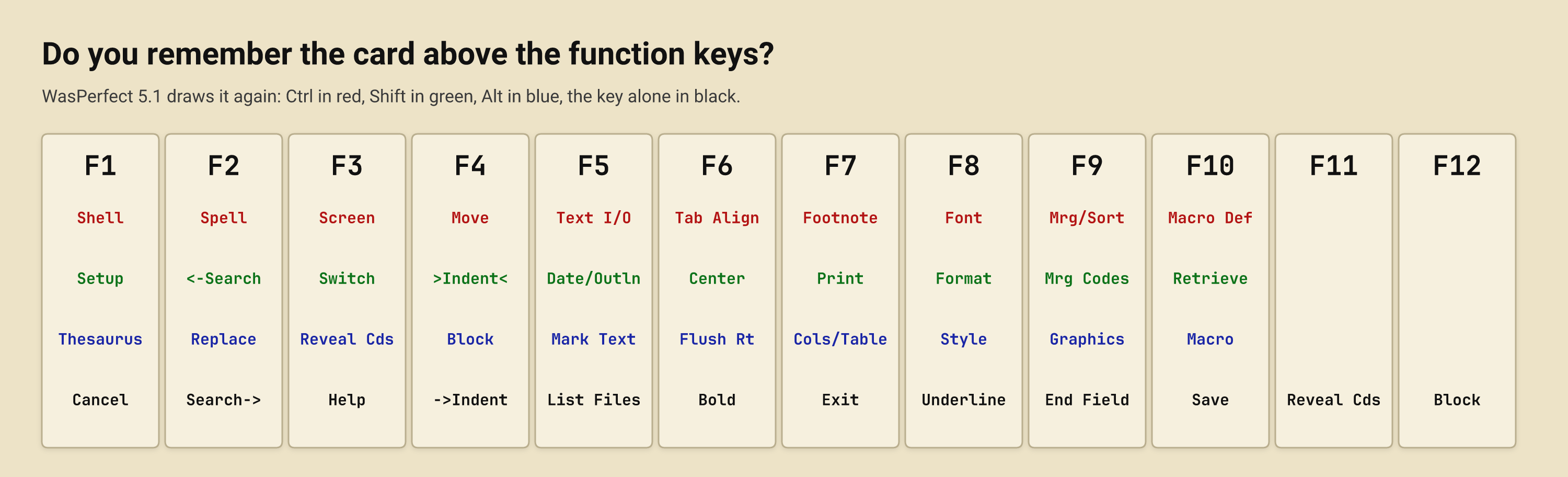
Do you remember what writing looked like on it? White letters on a blue screen, 80 columns, and nothing else. F10 saved. Shift-F7 printed. F3 was help. A plastic card above the function keys held the whole program, Ctrl in red, Alt in blue, Shift in green, and after a week it lived in your fingers instead.
That was before AI, before notifications, before a word processor wanted an account, a subscription or an opinion about your sentences. The computer did what you typed, at once, and nothing more. It was simple, and it was fun.
WasPerfect 5.1 brings that screen back. DopeCode, an independent Dutch studio, has rebuilt WordPerfect 5.1 for DOS, released in November 1989 and the version most people remember, from scratch as native software for iPad and Mac. It is not an emulator and not a skin: every keystroke, every menu and every beep behaves as it did in 1989.
- The blue screen. 80 columns of the era’s bitmap type and pull-down menus with red mnemonics. No toolbar, no ribbon, no sidebar.
- The template. On iPad it sits on screen under your thumbs, and a Bluetooth or USB keyboard works the F-keys as printed on the card. On Mac it runs along the window, and Alt-= opens the program’s own pull-down menus.
- Reveal Codes. Alt-F3 splits the screen and shows every formatting code where it lives.
- Your own files. Documents are plain files in iCloud Drive and the Files app. They save as Markdown, HTML, RTF or plain text, and print to paper or PDF. A document written on the iPad opens on the Mac without moving a comma.
- Nothing watching. No AI, no account, no analytics and no telemetry. The app makes no network requests of its own and works the same on a plane as at the kitchen table.
For anyone who grew up with it, the keys come back on their own. For anyone who learned to type on an iPhone, it is the quietest writing screen there is: one document, one cursor, and nothing that pings.
“WordPerfect never lost on DOS — it lost by leaving it,” said Ernest M. van der Linden, founder of DopeCode. “We rebuilt the version everyone actually loved, keystroke for keystroke, and gave it a home where the keyboard still rules.”
If an iPhone is where you are reading this, the iPad or the Mac on the desk is where the blue screen waits: WasPerfect runs on those two, not on iPhone.
WasPerfect 5.1 costs $9.99 on the App Store for iPad (iPadOS 16 or later) and $14.99 on the App Store for Mac (macOS 13 or later, Apple silicon and Intel). Each is one purchase, sold separately, with no subscription and no in-app purchases. More at https://wasperfect.dopecode.com.
About WasPerfect 5.1
WasPerfect 5.1 is a from-scratch recreation of the most widely used word processor of 1990 — not an emulator and not a skin. It runs fully offline, with no account, no analytics and no subscription; documents live in iCloud Drive and the Files app, and convert to Markdown, HTML, RTF and plain text on save.
About DopeCode
DopeCode is an independent software studio that builds focused, native tools.
Media contact
Ernest M. van der Linden · hello@dopecode.com
WasPerfect is an independent project. It is not affiliated with, endorsed by, or sponsored by Corel Corporation or Alludo. "WordPerfect" is a registered trademark of Corel Corporation, referenced only to identify the historical software that WasPerfect recreates. Apple, iPad, Mac and App Store are trademarks of Apple Inc.